

Friday, 19 December 2014
DAY 50
Today I patched up a few things on smoothing the river tile movement gif thing look better, and then sent it off to Ty to put in the game. Apparently you cannot upload a gif file to use as a background, you can only use it as an object, which is sort of annoying, but not a big problem. I also helped Ty with the speed dodge thingy. He has a yellow bar and regeneration set up for it already which is cool. One problem with the river tile I have is the sort of white siding and I don't know how it got there, other than that, It looks half-decent, though I could have made it less repetitive. A screenshot taken by Ty is below to show the stamina bar:

Thursday, 18 December 2014
DAY 49
Today I thought I was going to be done with the river tile movement, though when I looked back at the 10 frame movement of it, it just wasn't smooth enough. Ty wanted something like 60 frames because that is how fast our game runs in all the rooms and such, but that would take too much time on a tiny difference. I decided to restart it all and go with 20 frames, moving at roughly 6 pixels/frame. I made it 8 pixels/ frame on some because if there are 20 frames in a 128x128 square, it would be 6.4 pixels/frame exactly, and I can't do less than half a pixel. It doesn't really have to be exact anyway. Below is a comparison from when I first started to what I ended up with.


Wednesday, 17 December 2014
DAY 48
Today I realized that the water still looked a bit off from the rest of the textures in the game. I tried to manually pixellate the sprite, but it didn't look too great. So I then went to a website called lunapic, which lets you edit images, and gifs. So I uploaded the image, set the pixellation to 5, and it finally looked great. After that I decided that it needed to be less choppy because it only has 3 frames. So I recreated it and made it 10 frames this time. It looked a lot better and looked like it flowed more. It still does look a little bit choppy and I might end up increasing the flow rate from every frame to less than 12 pixels/frame.

Tuesday, 16 December 2014
DAY 47
Today I worked on creating the river tile so that it flows like water instead of what I tried yesterday. I found out it didn't work like that because the river has a flow look to it and it isn't just randomly placed pixels like the other tiles. I created 3 different images using paint so that the water would move within 3 frames. I uploaded them into the .gif maker website from yesterday and got a better looking river, though looks a bit choppy, which I am going to try and fix. I need to make it blend better as seen in the image below.

Monday, 15 December 2014
DAY 46
Today I wanted to try and make the water/river sprite tile for Lilum city, so that it looks like the water is actually flowing, and not just standing still lifelessly. Ty found a useful website that simply creates .gif's using multiple images instead of creating it through game maker studio. Also, when a .gif is imported into game maker studio as a sprite, it automatically using the animation which is nice. I am going to try and make maybe 6 animation frames and repeat itself, which is not going to be that easy, I have to line all of them up and at the same time, create an animation. I took all class trying out different ways to do this like creating random flows of the water, which turned out not too good, as seen in the example below. So I am going to have to do this the hard way, making it flow, it will also look better.

Thursday, 11 December 2014
DAY 45
Today I worked on creating the water or whatever you wanna call it tiles, and creating it so that it blends with the environment because everything else is pretty pixelly. I retried this multiple times because it just didn't look right, and kind of ended up with a half decent tile. My next problem is going to be making it so that it looks like water, animating it basically. I don't really know how to approach it but I'm thinking I could just have the water repeat itself infinitely as it moves, not sure how that would look though.

Wednesday, 10 December 2014
DAY 44
Today I tried to create my own particle effect using my other particle code for the blood. All I basically did was change the shape of the effect to "explosion" and the color to color4, which I have no idea what it is. I tried that and remembered for some reason the particle effects aren't working for some reason. I think it is because of the depth of the objects and such, for instance most of my objects have a depth of like -1111111 because why not. After failing at that I went over to Ty and he gave a suggestion for creating a river or water, which I tried before and it did not turn out as planned at all. This time however, looked significantly better, though is not finished yet. I want to try and make it blend with the environment and make it more pixelly. I also will need to make it line up with itself using it as tiles.

Tuesday, 9 December 2014
DAY 43
Today I tried to make the dodge move thing by myself without the use of the internet, but I tried many things and even if it did work, Ty's movement code for the actual game is completely different than mine so I wouldn't be able to implement it into the game. I might just ask Ty for the code and modify it so the dodge works. I then searched the internet for particle effects and tutorials on how to make them because I couldn't remember how I did the last one. It is quite simple actually all you do is implement the type of shape you want the particle and personalize it to your liking with the other bits of code.

Monday, 8 December 2014
DAY 42
Today I was watching someone play through the full game on Ty's computer, and noticed there was no benefit of going to kill the slime monsters and other mobs. I wanted to create either a potion which heals the player or something that will make the player want to kill the mob, even maybe a special sword or something. I tried this by creating a variable called sprite_index, and set it to the initial sprite of the enemy. Then when the enemy was killed, or in my case for the time being; clicked, the enemy would switch to sprite_index = (potion or drop sprite). This was fairly easy but i want to try and create another particle effect so it acts as maybe an orb that floats to the player slowly, and the heals them when it collides with it. I could just use the blood effect and change the color, but it is kind of being overused with the magic shot, and blood. I was going to watch this VIDEO, but I didn't have time, it seems useful.

Friday, 5 December 2014
DAY 41
Today I attempted the dodge/sprint move when shift pressed move. I tried to make it so that when shift was pressed, the speed was increased to 10 or something for like 1 second then went back to normal but it ended up doing weird things like going right without stopping. I then searched the internet for royalty free sound effects/music that we could use in the game. I found a few songs and tested them out on my game. I created a sound object in game maker and it played the song and looped it forever until I clicked New Game, or Load Game. Then the song was stopped and another song started to play and loop in the level room. I want to find a grass walking sound so that I can apply it to the player whenever it moves.

Thursday, 4 December 2014
DAY 40
Today I created a very simple car sprite using the Game Maker painter/editor thing. This isn't going to be the actual car, just a placeholder for the test car object. I made the car object a parent to the player object just to start with so I didn't have to redo all the movements. I made the player jump to the car every time it's clicked, though there were glitches. I then started working on the dodge/boost move for the player. I will have to try a different method than last time as it is inefficient.

Wednesday, 3 December 2014
DAY 39
Today I searched through the internet trying to find inspiration for a name for the game. We know that It will probably have the aspect of post-apocalypse in it so that could be incorporated into the name. Ty found this genius website which generates random names, though it probably won't be of use to us.

Tuesday, 2 December 2014
DAY 38
Today I wanted to try and make something that Ty mentioned to me yesterday; the player dashes forward for a second making it easier to escape enemies, like a dodge. I tried this by adding a piece of code in the player object making the speed of the player change +3 when space is pressed. I noticed that this actually made it slower and I would need to make it so it recharges. I asked Ty to create a quick tile sheet for me because he slightly modified most of my tiles. I received the tile sheet and began to create a basic room with roads and stuff. I am going to try and make a car soon so that the player can drive from the tutorial level to the main area quicker, it would also add more depth to the world.

Monday, 1 December 2014
DAY 37
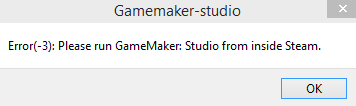
Today there was nothing else for me to do at the moment other than going back to the save/load game functions. Now that I have the master collection version of Game Maker Studio, it was a newer version so I can now use the drag and drop, and code saving functionality. This was about 100 times easier than using the other method of saving which is awesome. All I had to do was create a save object in which it tells the game to save as "save01" when it is clicked acting as a checkpoint. Then I made the "load game" button load the "save01" when it was clicked. Also, for some reason every time I click Game Maker from the taskbar, it shows this message:
Subscribe to:
Comments (Atom)